Standard Operating Procedure (SOP) for Laboratory Notebooks
0. Summary of Main Points
- Ownership: All lab notebooks, physical or electronic, are the property of EMBL.
- Responsibilities: The EMBL Directorate, according to the principles of IP51, decided that the EMBL Archive should be responsible for the systematic archiving of laboratory notebooks.
- Physical Notebooks:
- Researchers must register their notebooks with the process detailed in Annex A.
- Researchers transfer notebooks to their group upon leaving.
- Groups must send notebooks to the archive with proper documentation as part of the lab offboarding process.
- Electronic Notebooks:
- ARM strongly recommends that researchers and groups use LabID.
- ARM supports the researchers in ensuring that electronic notebooks are archived and stored securely when researchers or groups leave.
- The EMBL Archive documents all archived electronic notebooks.
- Documentation: Proper forms and logs must be maintained in the EMBL Archive for both physical and electronic notebook transfers and archiving.
1. Purpose and Scope
This Standard Operating Procedure (SOP) outlines the proper management, storage, and archiving of laboratory notebooks within EMBL. This applies to both physical and electronic lab notebooks across all research groups.
This SOP applies to all researchers and research groups within the institution who use laboratory notebooks, whether physical, electronic, or both, as part of their research activities.
2. Responsibilities
- Researchers: Ensure that their laboratory notebooks (physical or electronic) are properly maintained and, upon departure from the institution, that these notebooks are transferred to the research group leader, or to the responsible staff member.
- Research Group Leaders: Ensure the laboratory notebooks remain within the group upon the departure of any researcher. Upon the departure of the entire group, facilitate the transfer of all laboratory notebooks to the institutional archive.
- Human Resources (HR) and Information Technology (IT): Support the implementation of procedures for the archiving of electronic lab notebooks.
3. Procedure
3.1 Physical Laboratory Notebooks
- Definition: Laboratory Notebooks are used for the documentation of experimental procedures, protocol, data, and observations in a research environment.
- Storage: Researchers are responsible for the maintenance and safekeeping of their physical lab notebooks while actively engaged in research.
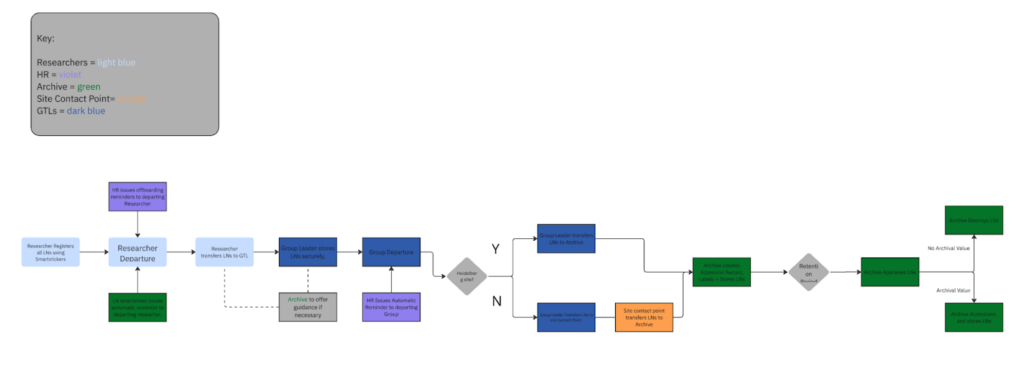
- Creation of Laboratory Notebooks: Scientists must use a sticker issued by OSIM or their site’s contact person for each physical laboratory notebook and register it via the smartsheet form using the QR code and unique ID number on the sticker (see Annex).
- Transfer upon Researcher Departure:
- Researchers should ensure that all of their details are legible on the LN stickers.
- When a researcher leaves, they must hand over their physical lab notebooks to the head of their research group or responsible staff member.
- Intermediate Storage: The group leader will securely store all the LNs of former staff scientists within the group.
- Archiving upon Group Departure: When a research group departs the organisation, the physical lab notebooks must be transferred to the archive or the responsible administration office of the respective site. (see below for list of responsible offices for each site)
- Documentation: The completed transfer forms and any related documentation must be retained by the EMBL archive. The archive must also complete the outstanding cells in the smartsheet.
List of responsible offices at each site:
Please contact the responsible office at your site to organise the transfer of your physical lab books to the EMBL Archive. Barcelona and Rome are TBD.
- EMBL Barcelona: Alexandre Robert, Facilities Manager.
- EMBL-EBI: Andrew Cornell, Facilities Manager.
- EMBL Grenoble: Nicolas Fortunato, Administrative Officer: Finance, Purchasing and Procurement.
- EMBL Hamburg: Margret Fischer, Administration Operations Manager.
- EMBL Heidelberg: EMBL Archive
- EMBL Rome: Neeya Jacob, Administrative Manager.
Physical Laboratory Notebooks Workflow:
3.2 Electronic Laboratory Notebooks [needs to be reviewed and agreed with WG]
- Definition: Electronic Laboratory Notebooks (eLNs) are digital platforms designed for the secure documentation of experimental procedures, protocol, data, and observations in a research environment. General-purpose platforms like GitHub, GitLab, Google Drive, or OneNote do not qualify as eLNs, even if used for research purposes, and therefore fall outside the scope of this SOP.
- Recommendations:
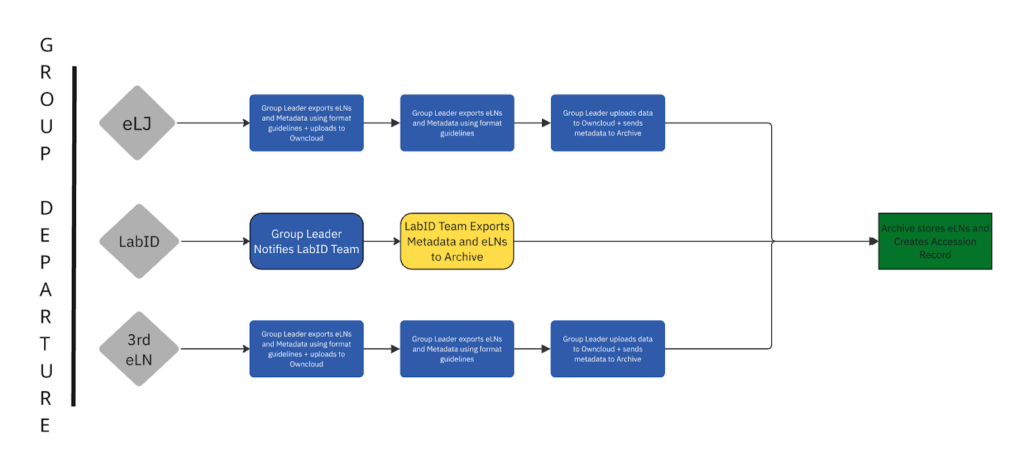
- EMBL has an in-house eLN which is available to all staff members, Lab Integrated Data (LabID). LabID is an open-source platform which is accessible on EMBL sites or via VPN, and all the data is stored on EMBL servers, making it an incredibly safe and secure option, with in-house technical support available from the dedicated LabID team (MODIS, DSC). Furthermore, for the purposes of archival storage, using LabID streamlines and simplifies the process, as GTLs only need to notify the LabID team of their departure and they will export the eLNs and transfer them to the Archive.
- EMBL has a contract with eLabJournal, an eLN application which stores data onsite on EMBL servers. When a scientific group leaves EMBL, eLNs can be exported and transferred to the archive.
- Ownership: All electronic laboratory notebooks are the property of EMBL.
- Storage and Maintenance: Researchers are responsible for ensuring that their electronic lab notebooks are properly stored within the approved software systems.
- Transfer upon Researcher Departure: Upon a researcher’s departure, access to and responsibility for their electronic lab notebooks should be transferred to the group leader.
- Archiving upon Group Departure:
- If using LabID, GTLs should inform Charles Girardot of their group’s departure.
- The LabID team will then export the eLNs and upload them to OwnCloud before sending a download link to ARM.
- ARM will then download the eLNs to a dedicated EMBL server for storage.
- If using eLabJournal or another eLN platform:
- GTLs will export the eLNs and upload them to OwnCloud before sending a download link to ARM.
- ARM will then download the eLNs to a dedicated EMBL server for storage.
- Information regarding exports can be found here: https://www.elabjournal.com/doc/ExportingProjects.html
- It is recommended that eLNs be stored in the following formats:
- PDF/A (for long-term archival storage).
- XML or JSON (for structured, searchable content).
- HTML or CSV (for tabular data).
- It is important that the following minimum metadata requirements are met:
- Group Name
- Researcher Name + ORCID.
- Date Range (20XX-20XX)
- If using LabID, GTLs should inform Charles Girardot of their group’s departure.
- Documentation: ARM must record the accession of the eLNs along with all relevant information.
Electronic Laboratory Notebook Workflow:
4. Appraisal and Destruction
eLNs and pLNs: Once the retention period is over, the EMBL Archive will appraise the laboratory notebooks for further archival value and either accession them into the archive or securely destroy them.
5. Review and Update of SOP
This SOP should be reviewed by the Archives and Records Management User Group on an annual basis, or as needed, to accommodate changes in technology or organisational policy.
Annex
How to Register Your Physical Laboratory Notebooks.
Tickets are issued to scientific groups by OSIM in Heidelberg, and by the administrative contact point at other sites (see above). Each sticker has a unique ID code, and should be fully filled out by the researcher. Once the LN is finished, the end date should be filled out and the LN should be given to the Group Leader for safekeeping.
The LN should then be registered via the Smartsheet Form. The following table explains the smartsheet form’s fields:
| Name of Field | Description |
|---|---|
| Notebook # | The unique ID code on the LN’s sticker. |
| Assigned to: NAME | Name of Researcher |
| Assigned to: ORCID | ORCID of Researcher (if applicable) |
| Date Assigned | Date the LN was issued |
| Group | Which Group/Department you belong to. |
| Group Leader | Name of the Group or Team Leader responsible for the LNs. |
| Contract End Date | End of the Researcher’s contract date. |
| Email Address | Your EMBL email (if you don’t have an EMBL email use your personal one). We’ll send you an automated reminder to hand in your laboratory notebooks to your Group Leader before you leave. |